
Textobjects
Selecting and manipulating text with textobjects
In Mitos, textobjects are a way to select, manipulate and operate on a piece of text in a structured way. They allow you to refer to blocks of text based on their structure or purpose, such as a word, sentence, paragraph, or even a function or block of code.

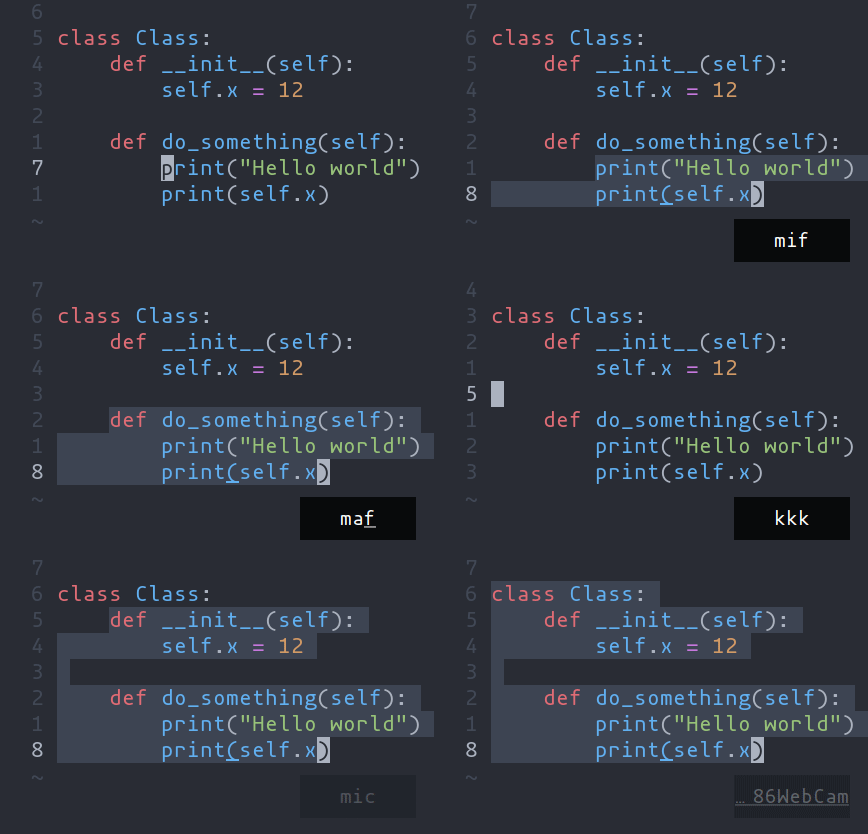
ma- Select around the object (vain Vim,<alt-a>in Kakoune)mi- Select inside the object (viin Vim,<alt-i>in Kakoune)
Key after mi or ma | Textobject selected |
|---|---|
w | Word |
W | WORD |
p | Paragraph |
(, [, ', etc. | Specified surround pairs |
m | The closest surround pair |
f | Function |
t | Type (or Class) |
a | Argument/parameter |
c | Comment |
T | Test |
g | Change |
s | Spelling finding |
x | (X)HTML element |
💡
f,t, etc. need a tree-sitter grammar active for the current document and a special tree-sitter query file to work properly. Only some grammars currently have the query file implemented. Contributions are welcome!
The s textobject uses spell-checking findings. Both
mis and mas select the diagnosed word under the cursor; mIs and mAs
select every finding fully contained in the current selection. Use [s and
]s to navigate to the previous or next finding. These commands also work in
plain text and scratch buffers when spell checking is enabled.
Navigating using tree-sitter textobjects
Navigating between functions, classes, parameters, and other elements is
possible using tree-sitter and textobject queries. For
example to move to the next function use ]f, to move to previous
type use [t, and so on.

For the full reference see the unimpaired section of the key bind documentation.
💡 This feature relies on tree-sitter textobjects and requires the corresponding query file to work properly.